Smart Engagement Step
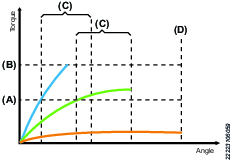
Smart engagement is used to facilitate screw engagement, normally at low RPM (100-150 rpm). Smart engagement first reaches an engagement torque and then has to stay below Max. torque and over the engagement torque during a set validation angle. By monitoring the torque during the validation angle and the tightening step angle, the step can instantly detect tilted and missing screws.
When reaching the set engagement torque a possible engagement is triggered. After reaching the engagement torque the controller will monitor the torque for a set validation angle to make sure that the screw is correctly engaged. If the tightening reaches max. torque or max. angle a retry action is triggered. A retry action can either consists of a retry or an abort. The user can define how the tightening should act according to the different errors. If the retry action is triggered due to max. torque it is most likely caused by a tilted screw and therefor retry is advised as a retry action.
If the retry action is triggered due to max. angle it is likely that the error was triggered by a missing screw and therefor abort is advised as a retry action.
Speed | The tool speed is programmable within the valid range. |
Engagement torque (A) | Activates validation angle after reaching the engagement torque. |
Validation angle (C) | Monitors the torque for a specified angle to make sure that the torque is above the engagement torque and below the max torque. Step is completed when these requirements are fulfilled. |
Retry action |
|
Loosening angle method |
|
Loosening angle | User defined angle used for retries. |
Loosening torque | Max. torque while loosening. |
Loosening speed | The speed set for loosening if a retry has been triggered. |
Direction | Direction of the tightening, clockwise or counterclockwise. Use clockwise setting for normal tightening |
Retry Signal | Defines what Externally Monitored Input should activate if the tool is currently loosening during a retry. |
Vacuum enabled | Digital output to switch on an external vacuum pump. |
Fast speed change | Makes it possible to shift fast between fast and slow speed. When enabled it will be possible to get a more accurate torque estimation for current controlled tools over a longer time frame. This applies in the transition of the current step and the next step. |
Max. torque (B) | If max torque is reached a retry action will be triggered. |
Max. angle (D) | If max angle is reached a retry action will be triggered. |
Retry limit | Number of times the tightening will try to retighten the screw after a retry action has been met. |
Step start delay | Delay from trigger to tool start. |
Min. step time | Minimum time for the step. If not reached, the controller will display an error message |
Max. step time | Maximum time for the step. If exceeded, the controller will display an error message. |









































