Incorrect seating point
Cause: Incorrect seating point is usually caused by incorrect setup.
Seating can falsely trigger at the beginning of a tightening when the tool goes rapidly from zero to start building some torque, this will make the gradient spike and thus incorrectly trigger a seating detection.
Incorrect seating displacement and gradient trigger can make the seating point appear out of place.
Low speed may cause the gradient torque to be unreadable. (Just like riding a bicycle, the slower you pedal the more you will sway, increasing the speed a little will create a straighter path.)
Solution:
If seating is triggered at the beginning of the tightening you must first add an angle or thread engagement step of 100° prior to the TSM or SCS step to get past the gradient spike at the beginning.
If seating is just off mark then the setup might be incorrect. This is how to properly setup the strategy:
Create a two-step tightening:
Step 1: Angle (or thread engagement) step of 100°.
Step 2: TSM/SCS.
Set the desired target and run a tightening.
Open the tightening graph in analysis.
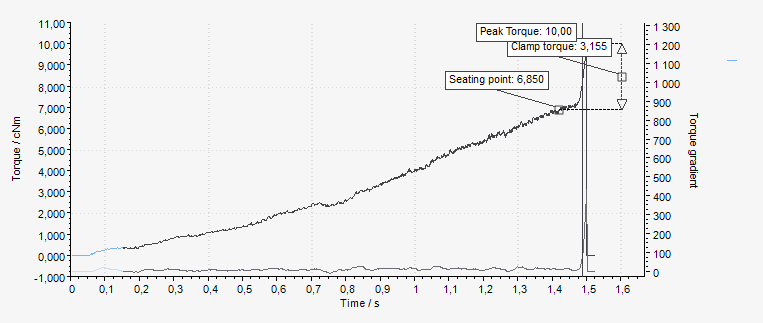
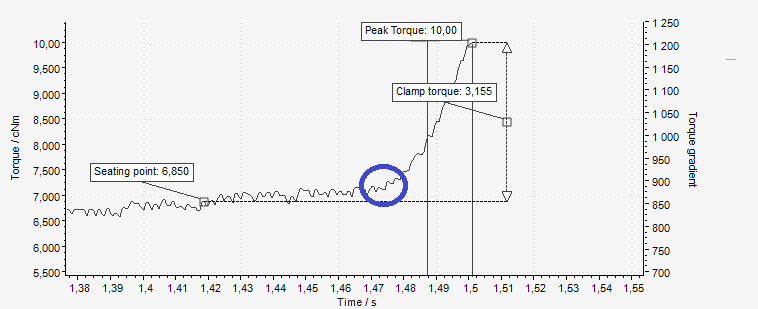
Check the gradient trigger point. The trigger point should be triggered about halfway through the clamping torque. This limit is based on the Torque gradient. If the trigger point is not OK, increase/decrease it to match the tightening. Redo tightening until the gradient trigger point is OK.
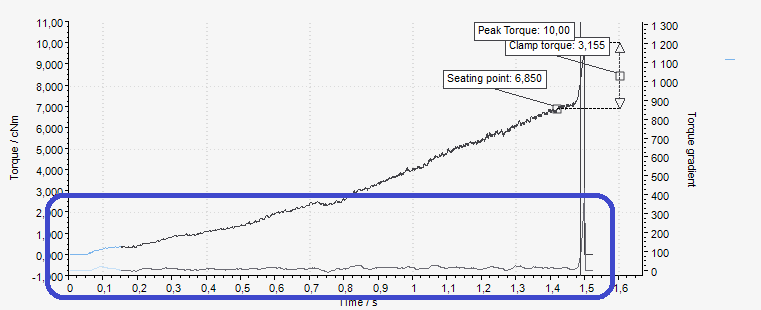
Change the seating angle displacement:
If the seating point is triggered Before the correct seating point, the seating angle displacement parameter should be decreased.
If the seating point is triggered After the correct seating point, the seating angle displacement parameter should be increased.
In the example above, the seating was triggered before the correct seating point. Therefore, the seating angle displacement should be decreased.
Redo tightening and tweak the seating angle displacement until it is set at the correct seating point.
If seating is still triggered at the beginning of the step, even if an angle/thread engagement step of 100° comes before it, the speed might be too low. If the gradient is incorrect, increase the speed and try again.









































