Calibration parameters

If the Power tool is not linked to a controller, Calibration is not available in the Test type window.
General category
Name: type the name of the inspection.
Barcode identifier: it identifies the inspection. If left blank, the identifier corresponds to the inspection name.
Strategy: select the tool strategy to use. The available strategies are:
Pulse tool
ACTA pulse tool
Available only for Pulse tools.
Number of samples: it specifies how many times the test is going to be run. The maximum number of samples is 99.
Torque tolerance: it defines the maximum percent difference between the average torque of the controller and the average torque of the device. It is expressed in percentage. By default the torque tolerance is equal to 5%. Available only for Power tools.
Angle tolerance: it defines the maximum percent difference between the average angle of the controller and the average angle of the device. It is expressed in percentage. By default the torque tolerance is equal to 5%. Available only for Power tools.
Power MACS mode (predefined calibration program): type the controller mode.
Available only for Power tools.Measuring device type: select the measuring device which runs the test. Below are the available options:
Manual selection
STbench
IRC-Connect
Filter frequency: type the value of the filter frequency. The allowed range is from 100 Hz to 2000 Hz. The default value is 850 Hz.
Available only for Pulse tools.Tightening direction: from the drop down list select the tightening direction. The available options are:
Clockwise
Counterclockwise
Available only for Pulse tools.
Controller category
The Controller category is available only for Power tools.
Type: it cannot be modified in this section: it is a parameter of the Controller. For more information about how to update the controller type, see the chapter Controllers.
Synchronization mode: select between the following:
Manual selection
Manual
Ethernet. This option is not available if the controller type is PowerMACS.
Serial
In case Manual selection is selected, during the calibration of the power tool with the controller, after tapping Play, a synchronization mode dialog box appears. Select the synchronization mode to continue the calibration process.
Serial number: it cannot be modified in this section: it is a parameter of the Controller. For more information about how to update the serial number of the controller, see the chapter Controllers.
IP Address: it cannot be modified in this section: it is a parameter of the Controller. This parameter is not available if the controller type is PowerMACS. For more information about how to update the IP Address of the controller, see the chapter Controllers.
Port number: it cannot be modified in this section: it is a parameter of the Controller. This parameter is not available if the controller type is PowerMACS. For more information about how to update the port number of the controller, see the chapter Controllers
Baud rate: it cannot be modified in this section: it is a parameter of the Controller. For more information about how to update the baud rate, see the chapter Controllers.
Joint category
The Joint category is available only for Power tools linked to Power Focus or Generic controller.
On the upper-right corner of the Joint category page, tap Save directly (none of the joints is selected). The device makes automatically a standard joint that permits to do the calibration inspection.
In the joint selection workspace, select the check box for manually selecting the joint that permits to do the calibration inspection. The following is displayed:
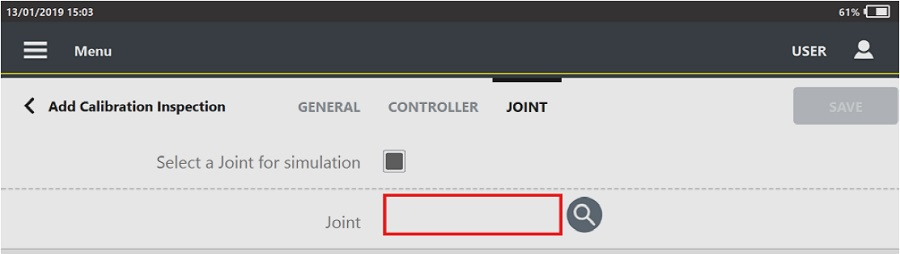
Tap the search icon (
 ) and select/create a joint, according to customer needs.
Torque category
The Torque category is available only for Pulse tools.
Torque correction: type the coefficient for torque correction.
The default value is 1. Available only for Pulse strategy.Torque tolerance: it defines the maximum percent difference between the average torque of the controller and the average torque of the device. It is expressed in percentage. By default the torque tolerance is equal to 5%.
Time category
The Time category is available only for Pulse tools.
Measure delay time: type the value of the measure delay time.
During the measure delay time the torque trace is not analyzed and the click-point is not detected.
The measure delay time ranges from 0.0 s to 5.0 s. Available only for ACTA pulse strategy.Reset time: type the value of the reset time.
During the reset time, the torque trace is not analyzed.
The reset time ranges from 0.0 s to 5.0 s. Available only for ACTA pulse strategy.End cycle time: type the value of the end cycle time. The test stops when the torque continues to be applied but it is under the Cycle complete for a time longer than the End cycle time.
The end cycle time ranges from 0.1 s to 5.0 s.









































