Overview of Available Step Restrictions
To make sure the tightening stops if something unexpected happens, it is possible to add restrictions to the multistep tightening program. These restrictions could, for example, test that a maximum torque is not reached or that a part of the multistep tightening does not take too long to run. Each step has its own set of mandatory step restrictions and optional step restrictions. The mandatory restrictions are included when dragging a new step to the multistep program. All steps can have up to four restrictions each.
The following restrictions are automatically added to every step that is added to the multistep tightening program:
Step Restriction | Applicable Steps |
|---|---|
Maximum Time | All |
Maximum Torque |
|
Maximum Angle |
|
CTh – Cross Thread
This restriction checks the angle from the point where torque passes Start torque (T1) to the point where the torque passes End torque (T2). If the angle measured from Start torque (T1) is higher than Maximum limit (Amax), the tool is stopped immediately.
When the torque passes End torque (T2), the measured angle is checked against the limit Minimum limit (Amin). If the angle is lower than this limit, the tool is stopped immediately.
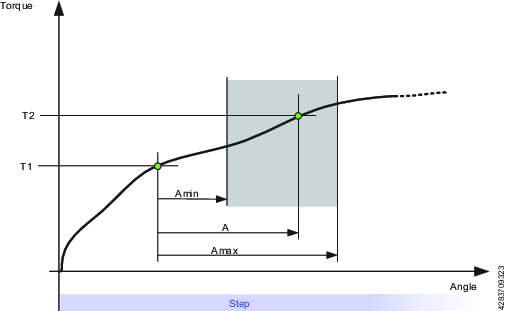
Parameter | Description | In illustration |
|---|---|---|
Start Torque | Must be <=0. | T1 |
End Torque | Must be <=0. | T2 |
Minimum Limit | The low angle limit. | Amin |
Maximum Limit | The high angle limit. | Amax |
A – Maximum Angle
This restriction measures the angle. If the measured angle reaches the Maximum Limit, the tool is stopped immediately. The angle is measured from the start of the restriction or, if specified, from the point where the torque passes Trigger Torque for the first time during the restriction.
Parameter | Description |
|---|---|
Trigger Torque | If specified, this is the torque from where the angle is measured. |
Maximum Limit | If this limit is reached the tool is stopped immediately. |
T – Maximum Torque
This restriction checks the torque. If the measured torque exceeds the Maximum limit, the tool is stopped immediately.
Parameter | Description |
|---|---|
Maximum Limit | If the torque reaches this specified limit the tool is stopped immediately. |
Ti – Maximum Time
This restriction checks the time. If Maximum Limit is reached, the tool is stopped immediately.
Parameter | Description |
|---|---|
Maximum Limit | If this time is elapsed, the tool is stopped immediately. |
Rh – Rehit
This restriction checks the torque. If the measured torque exceeds the Detection Torque, the tool is stopped immediately and the program jumps to the end of the program. It is only possible to add step Rehit restriction to the first step of the multistep tightening program. Once the Rehit restriction has been added to the first step it shall not be possible to move the step to any other position within the tightening program. The Rehit restriction has to be deleted from the first step in order to move it to other position in the tightening program.
Parameter | Description |
|---|---|
Detection Torque | If the measured torque exceeds the Detection Torque, the tool is stopped immediately and the program jumps to the end of the program. Must be greater than zero. |
RT – Rescinding Torque
This restriction checks the torque and if the measured torque drops below the condition of the restriction the tool is stopped immediately and the program jumps to end of the program. There are two methods of Rescinding Torque Restrictions for Torque and Angle control processes
Parameter | Description |
|---|---|
Type | Torque control processes or Angle control processes. Torque control processes: Torque control processes checks the torque. If the measured torque drops below the Rescinding Torque Limit the tool is stopped immediately and the program jumps to the end of the program. For the restriction to be active the torque must first exceed 110 % of the Rescinding Torque Limit Angle control processes: This restriction checks the maximum torque reached during the restriction. For the restriction to be active the torque must first exceed the Trigger Torque. If the measured torque drops below the maximum torque for longer time than Rescinding Torque Time the tool is stopped immediately and the program jumps to the end of the program. |
Rescinding Torque Limit | Default: 10 Nm. Must be > 0. |
TG – Torque Gradient
This restriction checks the gradient and if it is outside the limits the tool is stopped immediately and the program jumps to the end of the program.
Parameter | Description |
|---|---|
Gradient Angle Window | Specifies Angle Window:
|
Angle Window | Available when Gradient Angle Window is set to Manual. Must be > 0 and <= 100. |
Trigger Torque | Must be > 0 and < Tool MaxTorque. |
Damping | Frequency in which the gradient is being calculated. Must be > 0 and < 100 and < Angle window. |
Minimum Limit | Must be >= -100. |
Maximum Limit | Must be > -100 and > Low limit. |
Torque Filter Type | The type of the filter:
|
Cut-off Frequency | Needs to be specified when Torque Filter Type is set to Low pass:
|
Number of Samples | Needs to be specified when Torque Filter Type is set to Sliding Average:
|
TAW – Torque in Angle Window
This restriction checks that the measured torque in the Angle Window Length is between the Torque limits. If the measured torque is outside the limits the tool is stopped immediately and the program jumps to the end. The Angle Window Length starts at the Start Angle from the point that the torque first passed the Trigger Torque. If Trigger Torque is not set, then the Start Angle begins at the start of the restriction.
If the end of the Angle Window Length is not reached, the status of the restriction is NOK.
Parameter | Description |
|---|---|
Trigger Torque | Must be >= 0 |
Start Angle | Must be >= 0 |
Window Length | Must be >0 |
Minimum Limit | Must be >= 0 |
Maximum Limit | Must be <= Minimum limit |
TCD - Torque vs Current Deviation
This restriction verifies that all current measurements converted to the corresponding torque are, at most, the Maximum deviation away from the actual torque measured with the torque transducer. The restriction starts when the torque reaches Trigger Torque for the first time during the step and is active until the step reaches its target.
If Trigger Torque is never reached, the monitor will report OK.
Parameter | Description |
|---|---|
Trigger Torque | Must be >= 0 |
Maximum Deviation | Default: 1, Must be > 0 |









































