Results category for Dimensional inspection
In the Results category of the Run inspection page, the following is displayed:
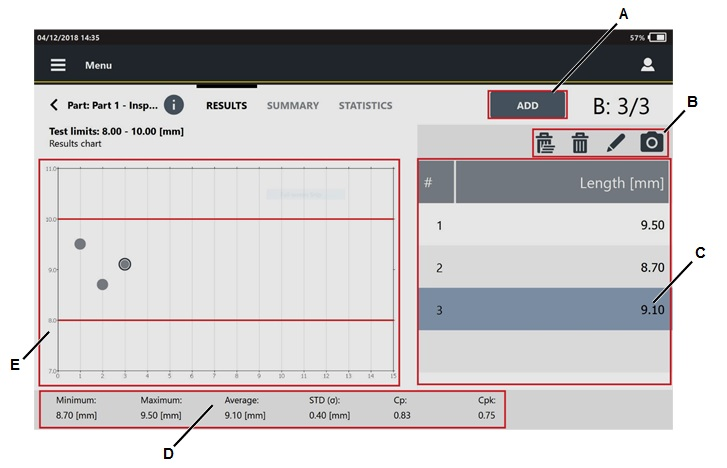
A | Add button | B | Command icons |
C | Results list | D | Statistics values |
E | Results chart |
On the left side of the Results page, the Result chart shows all the results of the inspection.
To add a result, tap Add, and then type the value in the Insert value dialog box.
On the right side of the Results page, the list of the results of the inspection is displayed.
If a result is NOK, the inserted value is highlighted in red.
The inspection is OK if both Cp and Cpk are equal or greater than Minimum Cp and Minimum Cpk.
In the lower part of the page, the following values are shown:
Minimum: minimum measured value.
Maximum: maximum measured value.
Average: average value of all measured values.
STD (σ): standard deviation of the measured values.
For Cp/Cpk (dimensional) inspection
Cp and Cpk values change after three results.
For SPC (dimensional) inspection
X and R values changes after three results.
When the subgroup is completed, the SPC rules check result window is displayed. In this window, the status of the SPC rules is shown. The inspection result depends on the enabled rules. If the rules results are positive, the inspection result is OK.
Below is the list of the rules results that can occur:
 : the rule result is OK.
 : the rule result is NOK.
 : the rule result is not enabled or it is not possible to make an analysis on it.
The inspection result depends on the enabled rules. If the rules results are positive, the inspection result is OK.
To delete one result (when enabled by external software), select it and tap the following icon:  .
.
To delete the whole set of results (when enabled by external software), tap the following icon:  .
.

For the SPC (dimensional) inspection, it is not possible to delete a result if the subgroup is completed.
To add a comment to a result, select it and tap the following icon:  .
.
To add a picture to a result, select it and tap the following icon:  .
.









































