Overview of Available Steps
The steps described in this section are available for creation of multistep tightening programs.

The following tightening steps are not supported for tools configured with Gear Front Attachment (GFA) of type open end:
Loosen to Angle
Loosen to Trigger Release
Loosen to Torque
Engage
Socket Release
Tighten to DynaTork
W – Wait
In this step the tool waits the specified amount of time. The tool does not rotate while waiting.
The tool waits the specified time. If the hold position is set to On the tool holds the position during the Wait time.
SR - Socket Release
This step runs the tool with speed n in the backward direction until the target angle is reached. The target angle is measured from the start of the step.
This step is only allowed to use as the last step in the tightening path of a multistep tightening program. However, it is possible to add a sync point after this step.
Parameter | Description |
|---|---|
Target angle | The angle target. Default: 3º , must be > 0 |
Speed ramp type | Hard, soft, or manual. Default: Hard. If you select Manual, the Speed ramp field opens. |
Speed ramp | If Speed ramp type is Manual, this field opens. Default: 500 rpm/s. |
Speed | Default: 60 rpm. |
A – Tighten to Angle / Loosen to Angle
A – Tighten to Angle
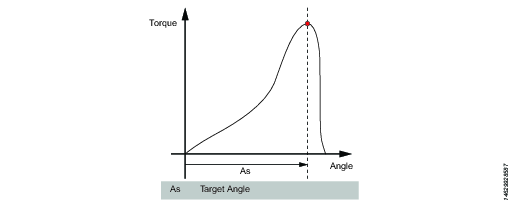
This step runs the tool until the target angle is reached. The target angle is measured from the start of the step.
A – Loosen to Angle
This step runs the tool with the speed n in the backward direction until the angle target is reached. The target angle is measured from the start of the step.
Parameters
Parameter | Description |
|---|---|
Target angle | The angle target. Must be > 0. |
Speed | Default: 60 rpm. |
Speed ramp type | Hard, soft, or manual. Default: Hard. If you select Manual, the Speed ramp field opens. |
Speed ramp | If Speed ramp type is Manual, this field opens. Default: 500 rpm/s. |
Brake (Only valid for PF6 Flex and PF6 Stepsync controllers). | If On the tool will be stopped when the target is reached. If Off the program goes directly to the next step without stopping the tool. |
TrR – Loosen to Trigger Release
This step runs in the backward direction until the tool trigger is released (loosen). It can only be used as a last step in a program.
Parameter | Description |
|---|---|
Speed | Numerical value for rotation speed; in rpm. |
Speed Ramp Type | List of options where speed ramp can be chosen [Hard, Soft, Manual] |
TTTR – Tighten to Trigger Release
This step runs until the tool trigger is released (tighten). It can only be used as a last step in a tightening program.
Parameter | Description |
|---|---|
Speed | Numerical value for rotation speed; in rpm. |
Speed Ramp Type | List of options where speed ramp can be chosen [Hard, Soft, Manual] |
T - Tighten to Torque / Loosen to Torque
T – Tighten to Torque
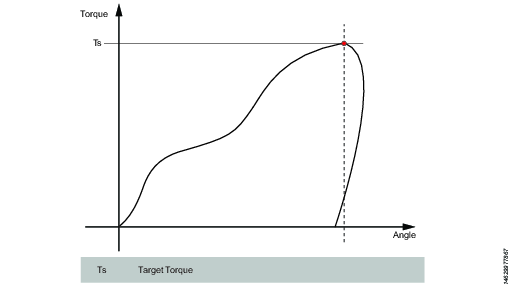
This step runs the tool with the programmed speed in forward direction until the target torque is reached.
Parameter | Description |
|---|---|
Target torque | The torque target. Must be > 0. |
Speed ramp type | Hard, soft, or manual. Default: Hard. If you select Manual, the Speed ramp field opens. |
Speed | Default: 60 rpm. Must be > 0. |
Speed ramp | If Speed ramp type is Manual, this field opens. Default: 500 rpm/s. |
Brake (Only valid for PF6 Flex and PF6 Stepsync controllers). | If On the tool will be stopped when the target is reached. If Off the program goes directly to the next step without stopping the tool. |
T – Loosen to Torque
This step runs the tool with the speed in the backward direction. For the step to be active, the torque must first exceed 110 % of the Target torque. The Target torque should be set to a positive value. After reaching the target torque, the step runs until the torque drops below the target torque.
Parameter | Description |
|---|---|
Target torque | The torque target. Must be > 0. |
Speed ramp type | Hard, soft, or manual. Default: Hard. If you select Manual, the Speed ramp field opens. |
Speed | Default: 60 rpm. Must be > 0. |
Speed ramp | If Speed ramp type is Manual, this field opens. Default: 500 rpm/s. |
Brake (Only valid for PF6 Flex and PF6 Stepsync controllers). | If On the tool will be stopped when the target is reached. If Off the program goes directly to the next step without stopping the tool. |
T+A – Tighten to Torque Plus Angle
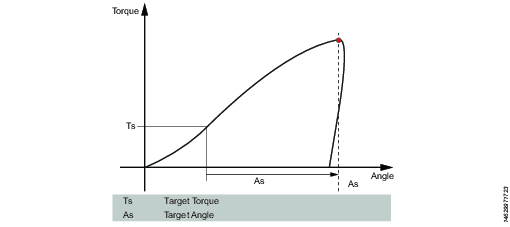
This step runs the tool until the target torque is reached. From this point it continues to run an additional target angle.
Parameter | Description |
|---|---|
Target torque | The torque target. Must be > 0. |
Target angle | The angle target. Must be > 0. |
Speed ramp type | Hard, soft, or manual. Default: Hard. If you select Manual, the Speed ramp field opens. |
Speed ramp | If Speed ramp type is Manual, this field opens. Default: 500 rpm/s. |
Speed | Default: 60 rpm. |
Brake (Only valid for PF6 Flex and PF6 Stepsync controllers). | If On the tool will be stopped when the target is reached. If Off the program goes directly to the next step without stopping the tool. |
T|A – Tighten to Torque or Angle
This step runs the tool with the speed n in the forward direction until the first of either torque target or angle target is reached. The torque and angle measurements start at the beginning of the step.
Parameter | Description |
|---|---|
Target torque | Must be > 0. |
Target angle | Must be > 0. |
Speed | Default: 60 rpm. Must be > 0. |
Speed ramp type | Hard, soft, or manual. Default: Hard. If you select Manual, the Speed ramp field opens. |
Speed ramp | If Speed ramp type is Manual, this field opens. Default: 500 rpm/s. |
Brake (Only valid for PF6 Flex and PF6 Stepsync controllers). | If On the tool will be stopped when the target is reached. If Off the program goes directly to the next step without stopping the tool. |
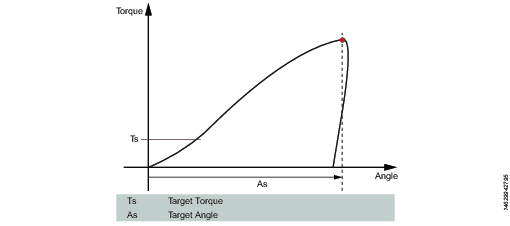
T&A – Tighten to Torque and Angle
The tool runs until with the specified speed in the forward direction until both target torque and target angle are reached. The target torque and the target angle must be set to > 0.
Parameter | Description |
|---|---|
Target torque | Must be > 0. |
Target angle | Default: 0. Must be > 0. |
Speed | Default: 60 rpm. Must be > 0. |
Speed ramp type | Hard, soft, or manual. Default: Hard. If you select Manual, the Speed ramp field opens. |
Brake (Only valid for PF6 Flex and PF6 Stepsync controllers). | If On the tool will be stopped when the target is reached. If Off the program goes directly to the next step without stopping the tool. |
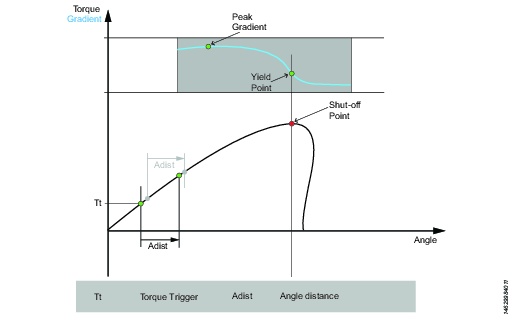
Y – Tighten to Yield
This strategy runs the tool with the speed in the forward direction until the yield point is detected. The yield point is found by monitoring the torque gradient from the point where the torque goes above the Trigger Torque level, calculated based on Torque and Angle distance measurements. The Angle distance parameter is set according to the specified hardness of the joint.
Set the Gradient angle window (for hard joint, for soft joint or for manually setting of the Angle window). If Manual is selected, the Angle Window must be set. A joint is considered Hard if the screw is tightened to its full torque and it rotates 30 degrees or less after it has been tightened to its snug point. A Soft joint rotates 720 degrees or more after it has been tightened to its snug point. The hardness parameter defines the Angle Window for the gradient calculation. The harder the joint - the smaller the angle window.
Parameter | Description |
|---|---|
Gradient Angle Window | Specifies Angle Window:
|
Angle Window | Available when Gradient Angle Window is set to Manual. Must be > 0 and <= 100. |
Trigger Torque | The angle measurement starts at this trigger. Must be >= 0 and < Tool MaxTorque. |
Damping | Frequency in which the gradient is being calculated. Must be > 0 and < 100 and < Angle window. |
Yield Point Percentage | Must be >= 20 % |
Speed | Default: 60 rpm. Must be > 0. |
Speed ramp type | Hard, soft, or manual. Default: Hard. If you select Manual, the Speed ramp field opens. |
Torque Filter Type | The type of the filter:
|
Cut-off Frequency | Needs to be specified when Torque Filter Type is set to Low pass:
|
Number of Samples | Needs to be specified when Torque Filter Type is set to Sliding Average:
|
Brake (Only valid for PF6 Flex and PF6 Stepsync controllers). | If On the tool will be stopped when the target is reached. If Off the program goes directly to the next step without stopping the tool. |
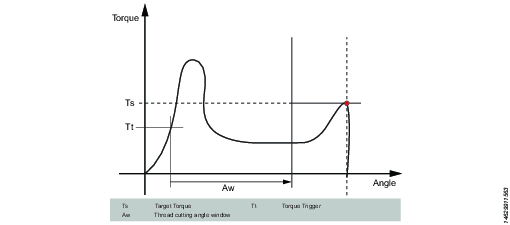
ThCT – Thread Cutting to Torque
The Thread Cutting to Torque function enables tightening where the Rundown torque required is greater than the Rundown complete torque, for example when tightening thin layers of metal using self-threading (or selftapping) screws. The tool runs in forward direction until the Thread Cutting Angle (Aw) is reached. The thread cutting angle window is measured from when the torque passes Thread Cut Trigger Torque (Ttc) for the first time. From the point where Thread cutting angle is reached, the step continues to run until the Target Torque (Tt) is reached.
Parameter | Description |
|---|---|
Target torque | Must be > 0. |
Thread Cutting Angle Window | Default: 0. Must be > 0. |
Trigger Torque | The angle measurement starts at this trigger. |
Speed | Default: 60 rpm. Must be > 0. |
Speed ramp type | Hard, soft, or manual. Default: Hard. If you select Manual, the Speed ramp field opens. |
Brake (Only valid for PF6 Flex and PF6 Stepsync controllers). | If On the tool will be stopped when the target is reached. If Off the program goes directly to the next step without stopping the tool. |
RD – Rundown
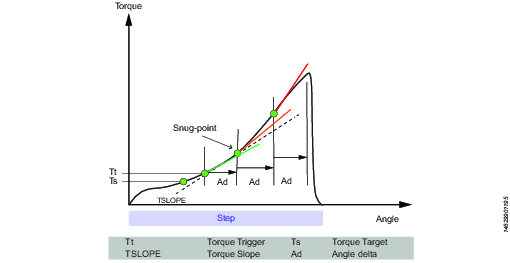
Rundown step is the part of the tightening from when the screw enters the thread until just before the screw head touches the underlying surface and snug point is reached. The torque required during rundown does not contribute to any clamping force.
This step runs the tool with the speed in the forward direction, and depending on the Rundown Type, Torque or Snug the step behavior is as follows:
Rundown Type: To Torque: The step stops when the specified target torque is found.
Rundown Type: To Snug: The snug gradient calculation starts at the specified torque trigger level Tt. If no torque trigger is set the gradient calculation is started at the start of the step.
The slope calculation is made between two angle points Ad degrees apart and is calculated as: (Tn – Tn-1) / (An – An-1) and as soon as two slopes after each other are larger than TSLOPE the snug point is found.
Parameter | Description |
|---|---|
Rundown type | To Torque or To Snug. |
Target torque | Default: "not set". Must be > 0. |
Speed | Default: 60 rpm. Must be > 0. |
Speed ramp type | Hard, soft, or manual. Default: Hard. If you select Manual, the Speed ramp field opens. |
Speed ramp | If Speed ramp type is Manual, this field opens. Default: 500 rpm/s. |
Trigger Torque | If Rundown type is To Snug, the Trigger torque field is displayed. Default: "not set". Must be > 0. |
Delta Angle | If Rundown type is To Snug, the Delta angle field is displayed. Default: "0". Must be > 0. |
Torque Rate | If Rundown type is To Snug, the Torque rate field is displayed. Default: "0". Must be > 0. |
Brake (Only valid for PF6 Flex and PF6 Stepsync controllers). | If On the tool will be stopped when the target is reached. If Off the program goes directly to the next step without stopping the tool. |
E - Engage
This step runs the tool in both directions until the socket engages the screw. The step continues until Target torque or Target angle is reached, provided that Continue if not Engaged is set to Yes. If Target Angle is reached in any direction, the direction is reversed. Limit the search iterations by entering Max Engage Attempts. If Target Torque is reached in any direction the step will finish with OK status.
Ext - External Result
External result is a strategy used when an OK tightening is indicated by an external digital signal (and not by torque or angle values measured during tightening). This external signal can be provided through any means that can provide a digital signal to the tool.
When the signal is sent, the result view (logged data) will show the value of the Target parameter provided in the tightening program (specified torque value, angle value, or text string). These (torque and angle) values do not represent actual measured values, but only inserted text.
Parameter | Description |
|---|---|
Torque <Target torque> | Numerical value for desired displayed target torque value. A signal could for example come from a Click Wrench and display <Target torque>. |
Angle <Target angle> | Numerical value for desired displayed target angle value. A signal could for example come from a Click Wrench and display <Target angle>. |
Text | Alphanumerical string for desired displayed text. For example: "Oil has been changed". |
TC - Torque Calibration
This step is only supported for dual transducer tools.
The Torque Calibration step runs the tool with the specified speed in the forward direction until the torque target is reached.
Parameter | Description |
|---|---|
Target torque | Must be > 0. |
Speed | Must be > 0. Default: 60 rpm. |
Transducer | Main or Secondary. Default: Main. Set to Secondary in order to calibrate the front transducer. |
Adaptive brake | If On the tool will be stopped when the target is reached. If Off the program goes directly to the next step without stopping the tool. |
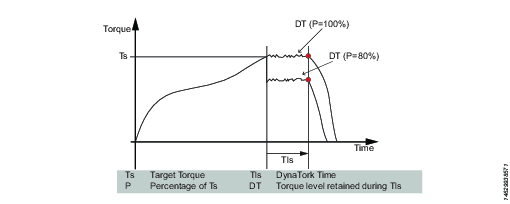
DT - Tighten to DynaTork
This step runs the tool with speed n in the forward direction until the Target torque is reached. The tool will then hold the current constant at the DynaTork Percentage of Target torque during the DynaTork time.
To avoid overheating of the tool, it is strongly recommended to never run DynaTork to more than 40% of the maximum torque of the tool.
Parameter | Description |
|---|---|
Target torque | The torque target. Must be > 0. |
DynaTork time | The time DynaTork will be active. |
DynaTork Percentage | The percentage of Torque target. |
Brake | If On the tool will be stopped when the target is reached. If Off the program goes directly to the next step without stopping the tool. |
Speed ramp type | Hard, soft, or manual. Default: Hard. If you select Manual, the Speed ramp field opens. |
Speed ramp | If Speed ramp type is Manual, this field opens. Default: 500 rpm/s. |
Speed (rpm) | Default: 60 rpm. |