Angle step
The angle step is used to run the screw down for a certain number of revolutions, most of the time at high RPM. The angle step is finished when the angle target is reached.
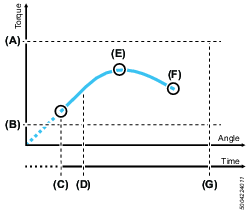
A | Max. torque |
B | Min. torque |
C | Step start |
D | Min. step time |
E | Peak torque |
F | Target angle / Final torque |
G | Max. step time |
Parameter | Description |
Speed | The tool speed is programmable within the valid range. |
Target angle (F) | The angle that shall be reached to successfully complete the step. |
Direction | Use clockwise setting for normal tightening. |
Vacuum enabled | Digital output to switch on an external vacuum pump. |
Fast speed change | Makes it possible to shift fast between fast and slow speed. When enabled it will be possible to get a more accurate torque estimation for current controlled tools over a longer time frame. This applies in the transition of the current step and the next step. |
Min. torque (B) | The torque must not be below the set min. torque during the step. If the torque drops below the minimum torque the driver will stop and the controller will display an error message. If min. Torque is set above 0 cNm, add a step before the angle step to reach the set torque before the angle step starts. |
Max. torque (A) | The maximum torque value must not be exceeded during the step. If the maximum torque is reached, the driver will stop and the controller will display an error message. |
Step start delay | Delay from trigger to tool start. |
Min. step time (D) | Setting a minimum time for the step. If not reached the controller will display an error message. |
Max. step time (G) | Setting a maximum time for the step. If exceeded, the controller will display an error message. |









































