Route
The route is a set of tests to run.
The device can store up to 100 routes into its memory. Each route can include up to 500 Inspections.
Tap the Menu icon ( ) in the Home page. Then, select Route from the Menu list.
The following is displayed:
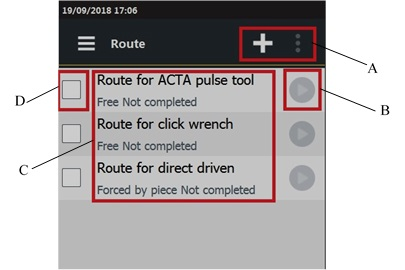
A | Command buttons | B | Play button |
C | List of Routes | D | Route check box |
In each row, the following information are shown:
Name: it is assigned when the route is created. For more information about how to edit the Route name, see “Editing the Route name".
Sequence: it can be either "Free" or "Forced by piece", depending on the way the inspections configured in the Route are run.
Status: it can be either “Completed” or “Not completed” depending on the status of the route.
Play: icon to run the inspection. If the icon is unavailable, no inspection is available.









































