STRwrench Battery
Battery
Product Information
General Information

Safety Signal Words
The safety signal words Danger, Warning, Caution, and Notice have the following meanings:
DANGER | DANGER indicates a hazardous situation which, if not avoided, will result in death or serious injury. |
WARNING | WARNING indicates a hazardous situation which, if not avoided, could result in death or serious injury. |
CAUTION | CAUTION, used with the safety alert symbol, indicates a hazardous situation which, if not avoided, could result in minor or moderate injury. |
NOTICE | NOTICE is used to address practices not related to personal injury. |
ServAid
ServAid is a portal that is continuously updated and contains Technical Information, such as:
Regulatory and Safety Information
Technical Data
Installation, Operation and Service Instructions
Spare Parts Lists
Accessories
Dimensional Drawings
Please visit: https://servaid.atlascopco.com.
For further Technical Information, please contact your local Atlas Copco representative.
Website
Information concerning our Products, Accessories, Spare Parts and Published Matters can be found on the Atlas Copco website.
Please visit: www.atlascopco.com.
Safety Data Sheets MSDS/SDS
The Safety Data Sheets describe the chemical products sold by Atlas Copco.
Please consult the Atlas Copco website for more information www.atlascopco.com/sds.
Country of Origin
For the Country of Origin, please refer to the information on the product label.
Dimensional Drawings
Dimensional Drawings can be found either in the Dimensional Drawings Archive, or on ServAid.
Please visit: http://webbox.atlascopco.com/webbox/dimdrw or https://servaid.atlascopco.com.
Overview
Battery Overview
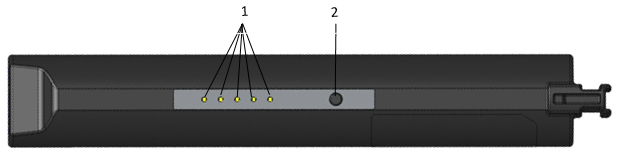
1 | State of charge indicators | 2 | State of charge button |
Ambient Temperature
Operating temperature, charge | +0 to +40 °C |
Operating temperature, discharge | 0 to + 60 °C |
Storage temperature, max 1 year | −20 to +20 °C |
Charger Compatibility
Accessory | Article nr. |
|---|---|
STRwrench charger | 8059 0924 10 |
Charger Temperatures
Operating temperature | +5 to +40 °C |
Installation
Installation Instructions
Attaching the Battery
Unscrew the battery cap placed on the wrench handle.
Insert the battery into the wrench handle by aligning it with the nut inside until the mechanic stop.
Screw the battery cap on the wrench handle.

Removing the Battery
Unscrew the battery cap placed on the wrench handle.
Pull the battery out of the wrench handle.
Screw the battery cap on the wrench handle.

Operation
Ergonomic Guidelines
Consider your workstation as you read through this list of general ergonomic guidelines to identify areas for improvement in posture, component placement, or work environment.
Take frequent breaks and change work positions frequently.
Adapt the workstation area to your needs and the work task.
Adjust for a convenient reach range by determining where parts and tools need to be located to avoid static load.
Use workstation equipment such as tables and chairs appropriate for the work task.
Avoid work positions above shoulder level or with static holding during assembly operations.
When working above shoulder level, reduce the load on the static muscles by lowering the weight of the tool, using for example torque arms, hose reels or weight balancers. You can also reduce the load on the static muscles by holding the tool close to the body.
Take frequent breaks.
Avoid extreme arm or wrist postures, particularly during operations requiring a degree of force.
Adjust for a convenient field of vision that requires minimal eye and head movements.
Use appropriate lighting for the work task.
Select the appropriate tool for the work task.
In noisy environments, use ear protection equipment.
Use high-quality inserted tools and consumables to minimize exposure to excessive levels of vibration.
Minimize exposure to reaction forces.
When cutting:
A cut-off wheel can get stuck if the cut-off wheel is bent or not guided properly. Use the correct flange for the cut-off wheel and avoid bending the cut-off wheel during operation.
When drilling:
The drill might stall when the drill bit breaks through. Use support handles if the stall torque is high. The safety standard ISO11148 part 3 recommends using a device to absorb a reaction torque above 10 Nm for pistol grip tools and 4 Nm for straight tools.
When using direct-driven screwdrivers or nutrunners:
Reaction forces depend on the tool settings and joint characteristics. Strength and posture determine the amount of reaction force that an operator can tolerate. Adapt the torque setting to the operator's strength and posture and use a torque arm or reaction bar if the torque is too high.
In dusty environments, use a dust extraction system or wear a mouth protection mask.
Operating Instructions
General Operation Safety
Read these safety instructions before use.
Operation
Check the battery pack for damage before every use. Do not use damaged devices.
The battery voltage must match the voltage mentioned on the type plate of the charger and tool.
Use power tools only with specifically designated battery packs. Use of any other battery packs may create a risk of injury and fire.
Do not incinerate, dissemble or crush the battery pack.
Avoid contact with fluids oozing out of defective battery packs. Rinse with water in case of accidental contact with fluid. Consult a doctor if fluid comes into contact with eyes.
Charging
Other chargers than the one stated under Charger Compatibility are not allowed. Charging the battery on a not approved charger is considered as altering the system and will make the tool certification invalid.
Insert only clean and dry battery packs into the battery holder of the charger.
If a protective cover is used on the battery, make sure the cover is removed and look for potential damage before charging.
Check for damage on the battery before charging. Do not charge any battery pack that has been damaged during use or by accident (e.g. dents on the housing or any other damages). Replace damaged battery packs.
Always remove fully charged batteries from the charger. Do not let the fully charged battery remain on the charger.
Do not operate the charger close to an explosive environment, for example close to a gas filling station.
Do not expose the battery pack to temperatures above 60 °C.
We recommend users to operate the charger in a defined protected and secure area (e.g. in charging cabinets or under supervision).
Make sure the charger is stable when charging, to ensure that the batteries do not fall to the floor.
If you identify noise or extensive heat from a battery:
If charging, unplug the charger. Do not remove the battery.
Step away from the battery.
Leave the battery for 12 hours.
Contact your Atlas Copco representative.
Storage
Store batteries in the temperature range from 10 °C to 25 °C.
Do not store the battery packs along with metal objects. No metal parts should come in contact with battery connectors; risk of short circuit.
Store batteries and chargers in a dry place, and keep dry at all times.
Avoid storing batteries fully charged.
Do not store your battery connected to the power tool for longer periods
Maintenance charge batteries in storage, every 4 months.
Disposal
Do not dispose of battery packs by throwing them into fire or through household waste.
Battery State of Charge indicators
The LED indicators on the battery indicate the State of Charge (SOC) of the battery. To activate the LEDs, press the button placed on the battery.
1 | LED indicators | 2 | Button |
The LEDs indicate the remaining capacity of the battery as follows:
Battery charge indicator | Remark |
|---|---|
1 LED | Empty (0%-15%) |
2 LEDs | Nearly empty (15%-21%) |
3 LEDs | Low (22%-34%) |
4 LEDs | Medium (35%-89%) |
5 LEDs | Full (90%-to 100%) |
Recycling
Environmental Regulations
When a product has served its purpose it has to be recycled properly. Dismantle the product and recycle the components in accordance with local legislation.
Batteries shall be taken care of by your national battery recovery organization.