Test run
In the Home page, tap Configuration > General settings > Test run to open the Test run settings page:
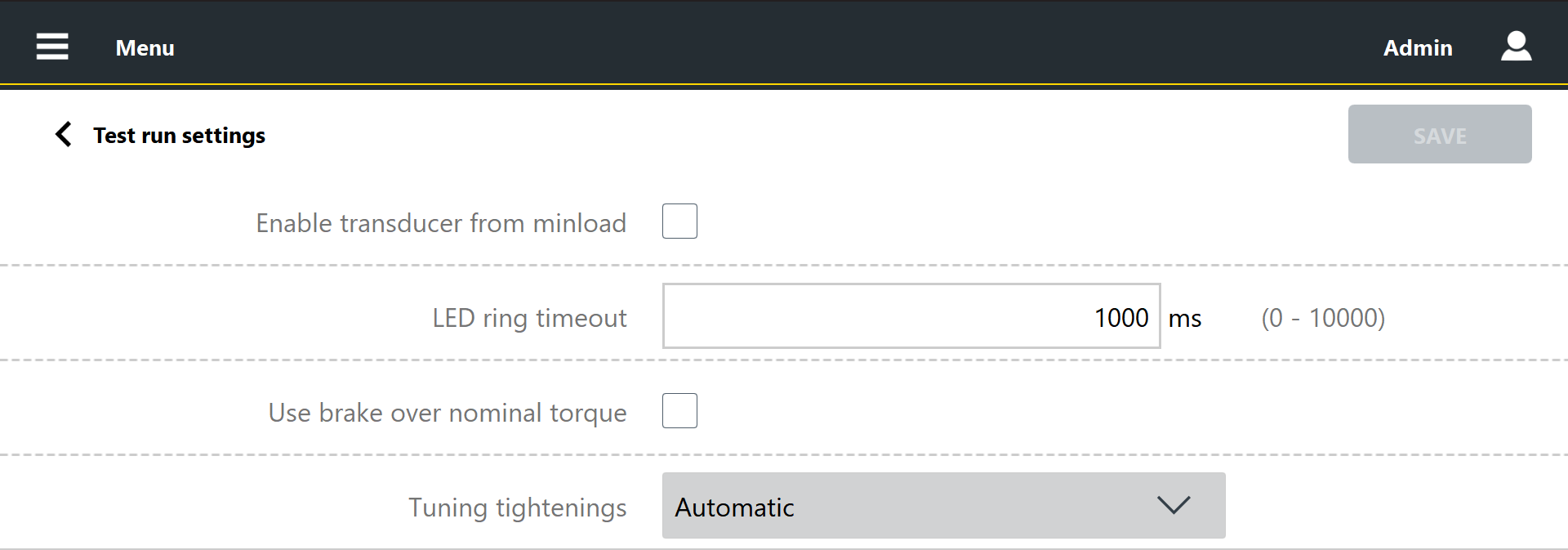
Configure the following parameters:
Enable transducer from minload: select the check box to enable the use of transducer with a minimum load value lower than the inspection minimum torque value.
If the check box is not selected, the transducers with a minimum operating range value lower than the inspection minimum torque value can be used to run the test.
By default, the Enable transducer from minload check box is unselected.
LED ring timeout: type the value in milliseconds after which the OK (green) and NOK (red) LEDs on the STbench turn off.
If the value is set to 0 ms, the LED ring is always white.
Use brake over nominal torque: select the check box to run tests on the STbench brakes, in which the inspection maximum torque exceeds the brake operating range.
Tuning tightenings: In the drop-down list, select the frequency with which the STbench brakes must perform an optimization of the braking:
Automatic: the system select the most suitable frequency for the ongoing inspection.
First run: tuning is performed only the first time the inspection is run.
Always: tuning is performed every time the inspection is run.
To apply the configuration changes, click Save in the upper-right corner of the page.