BCV BL-30-10
Battery-Powered Screwdriver
Product Information
General Information

Power Tool Information
Safety Signal Words
The safety signal words Danger, Warning, Caution, and Notice have the following meanings:
DANGER | DANGER indicates a hazardous situation which, if not avoided, will result in death or serious injury. |
WARNING | WARNING indicates a hazardous situation which, if not avoided, could result in death or serious injury. |
CAUTION | CAUTION, used with the safety alert symbol, indicates a hazardous situation which, if not avoided, could result in minor or moderate injury. |
NOTICE | NOTICE is used to address practices not related to personal injury. |
Warranty
Product warranty will expire in 12+1 months after dispatch from Atlas Copco's Distribution Center.
Normal wear and tear on parts is not included within the warranty.
Normal wear and tear is that which requires a part change or other adjustment/overhaul during standard tool maintenance typical for that period (expressed in time, operation hours or otherwise).
The product warranty relies on the correct use, maintenance, and repair of the tool and its component parts.
Damage to parts that occurs as a result of inadequate maintenance or performed by parties other than Atlas Copco or their Certified Service Partners during the warranty period is not covered by the warranty.
To avoid damage or destruction of tool parts, service the tool according to the recommended maintenance schedules and follow the correct instructions.
Warranty repairs are performed only in Atlas Copco workshops or by Certified Service Partners.
Atlas Copco offers extended warranty and state-of-the-art preventive maintenance through its ToolCover contracts. For further information, contact your local Service representative.
For electrical motors:
Warranty will apply, only when the electric motor has not been opened.
Website
Information concerning our Products, Accessories, Spare Parts and Published Matters can be found on the Atlas Copco website.
Please visit: www.atlascopco.com.
ServAid
ServAid is a portal that is continuously updated and contains Technical Information, such as:
Regulatory and Safety Information
Technical Data
Installation, Operation and Service Instructions
Spare Parts Lists
Accessories
Dimensional Drawings
Please visit: https://servaid.atlascopco.com.
For further Technical Information, please contact your local Atlas Copco representative.
Safety Data Sheets MSDS/SDS
The Safety Data Sheets describe the chemical products sold by Atlas Copco.
Please consult the Atlas Copco website for more information www.atlascopco.com/sds.
Product Safety Video for Nutrunners
Learn more about safety features on Atlas Copco nutrunners and what measures the operator has to take for a safe operation. Click the link or scan the QR code below to view the video:
https://www.youtube.com/watch?v=FAh6yttvUpw

Country of Origin
For the Country of Origin, please refer to the information on the product label.
Dimensional Drawings
Dimensional Drawings can be found either in the Dimensional Drawings Archive, or on ServAid.
Please visit: https://webbox.atlascopco.com/webbox/dimdrw or https://servaid.atlascopco.com.
Overview
General Description
The BCV clutch nutrunner is a lightweight and handy tool ideal for quality critical joints and applications where flexibility is essential. Its’ compact size and Lithium-Ion batteries put it among the lightest battery nutrunners on the market. The BCV provides variable speed and plenty of power within its’ range of torques levels, offering maximum operator comfort. The slim, well-balanced design and ergonomic angle makes the BCV nutrunner the kind of tool that you can work with all day.
Features
High power-to-weight
Brushless motor and magnetic hall sensors for high durability
Unrivalled clutch design for excellent torque repeatability and low mean shift
Two strong front lights for best visibility
Speed setting functionality
Li-Ion better technology
Benefits
No trip hazards from trailing cables
No product damage from cables or hoses
High performance and durability
Reduced operator fatigue
Ambient Temperature
For best battery performance and life time, keep battery within temperature intervals.
Operating temperature, charge | +5 to +40 °C |
Operating temperature, discharge | 0 to +40 °C |
Transportation temperature | −20 to +40 °C |
Storage temperature | +10 to +25 °C |
Do not place battery in direct sunlight.
Technical Product Data
Technical Product Data can be found on either ServAid, or the Atlas Copco website.
Please visit: https://servaid.atlascopco.com or www.atlascopco.com.
If the Technical Product Data is not available on either website, please contact the local Atlas Copco Customer Center for assistance.
Installation
Installation Requirements
Installation
For installation guideline, see Power Focus 6000 user guide.
Operation
Ergonomic Guidelines
Consider your workstation as you read through this list of general ergonomic guidelines to identify areas for improvement in posture, component placement, or work environment.
Take frequent breaks and change work positions frequently.
Adapt the workstation area to your needs and the work task.
Adjust for a convenient reach range by determining where parts and tools need to be located to avoid static load.
Use workstation equipment such as tables and chairs appropriate for the work task.
Avoid work positions above shoulder level or with static holding during assembly operations.
When working above shoulder level, reduce the load on the static muscles by lowering the weight of the tool, using for example torque arms, hose reels or weight balancers. You can also reduce the load on the static muscles by holding the tool close to the body.
Take frequent breaks.
Avoid extreme arm or wrist postures, particularly during operations requiring a degree of force.
Adjust for a convenient field of vision that requires minimal eye and head movements.
Use appropriate lighting for the work task.
Select the appropriate tool for the work task.
In noisy environments, use ear protection equipment.
Use high-quality inserted tools and consumables to minimize exposure to excessive levels of vibration.
Minimize exposure to reaction forces.
When cutting:
A cut-off wheel can get stuck if the cut-off wheel is bent or not guided properly. Always use the correct flange for the cut-off wheel and avoid bending the cut-off wheel during operation.
When drilling:
The drill might stall when the drill bit breaks through. Use support handles if the stall torque is high. The safety standard ISO11148 part 3 recommends using a device to absorb a reaction torque above 10 Nm for pistol grip tools and 4 Nm for straight tools.
When using direct-driven screwdrivers or nutrunners:
Reaction forces depend on the tool settings and joint characteristics. Strength and posture determine the amount of reaction force that an operator can tolerate. Adapt the torque setting to the operator's strength and posture and use a torque arm or reaction bar if the torque is too high.
In dusty environments, use a dust extraction system or wear a mouth protection mask.
Operating Instructions
Battery Packs
Fully charge new or long time unused battery packs before using your battery machine. Full loading capacity of battery pack is reached after 4 – 5 chargings.
The contact points of chargers and battery packs must be kept clean.
If the machine will not be used for 100 hours or longer: separate the battery from the machine. Otherwise the electronics will discharge the battery.
Service
Preventing ESD Problems
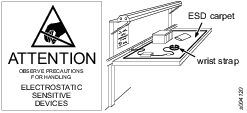
The components inside the product and controller are sensitive to electrostatic discharge. To avoid future malfunction, make sure that service and maintenance is carried out in an ESD approved work environment. The figure below shows an example of an appropriate service work station.
Maintenance Instructions
Service Recommendations
Preventive maintenance is recommended at regular intervals. See the detailed information in Preventive Maintenance. If the product is not working properly, take it out of service and inspect it.
If no detailed information about preventive maintenance is included, follow these general guidelines:
Clean appropriate parts accurately.
Replace any defective or worn parts.
Preventive Maintenance
Maximizing Battery Life
Do not leave the battery connected to the tool if you do not use the tool for several days. The battery can discharge and go into “sleep mode” which will require a special wake-up charge procedure. For further information, see instructions for multicharger, 4211542485.
Lubrication Instructions
Lubrication
Lubricate according to the Lubrication Guide at each service occasion.
For more information, see Spare Parts section in ServAid - https://servaid.atlascopco.com.
Troubleshooting
Overheated Tool
The tool can handle any normal line jobs that an operator sustains with the proper adjustments.
The tool temperature can be influenced by the following parameters:
short cycle time
torque above rated
too low speed
very high prevailing torque
very soft joints
ambient temperature
Error Codes
LED | |
|---|---|
 | 3 red flashes followed by 2 yellow flashes Clutch sensor error. The tool does not start or stops correctly. |
The signal given by the clutch sensor is out of tolerances. Do a check of the sensor and the magnets for the sensor. Make sure that the flex is connected correctly to the electronic board. If the fault still appears, contact customer service. | |
 | 3 red flashes followed by 3 yellow flashes The temperature is over the maximum limit of 70°C. The tool does not start or stops correctly. |
The temperature measured with the electronic board is higher than 70°C. Wait for the tool to cool down. When the temperature is lower than 70°C it is possible to operate the tool again. Decrease the tool rate. If the temperature is lower than 70°C and the fault still appears, contact customer service | |
 | 3 red flashes followed by 4 yellow flashes Overheated tool. Too high current over too long time. The tool does not start or stops correctly. |
The power requested is too big. If the fault still appears, contact customer service. | |
 | 3 red flashes followed by 5 yellow flashes Battery voltage fault. The tool does not start or stops correctly. |
The battery voltage is not correct for the tool. Make sure that the correct battery is used. If the battery used is correct and the fault still appears, contact customer service. | |
 | 3 red flashes followed by 6 yellow flashes Overcurrent on the power circuit. The hardware limit is reached. The tool does not start or stops correctly. |
If the fault still appears, the power stage is faulty, contact customer service | |
| 3 red flashes followed by 7 yellow flashes Motor stall. The motor is blocked or the sensors feedback do not fit with the tool drive request. |
Replace the motor. If after replacing the motor the fault still appears, contact customer service. |

Recycling
Environmental Regulations
When a product has served its purpose, it must be recycled properly. Dismantle the product and recycle the components in accordance with local legislation.
Batteries may contain hazardous substances that can cause serious harm to the environment, human health, and safety if not handled correctly. Do not dispose of batteries in household waste. Batteries must be collected separately for recycling and must be placed in a battery recycling bin. This product and its information meet the requirements of the Battery Regulation (EU) 2023/1542 and must be handled in compliance with the regulation. Batteries are marked with a crossed-out wheeled bin symbol without a single black bar underneath. The battery must be recycled either according to local regulations or sent to your local Atlas Copco Customer Center for handling. Batteries must be handled by trained personnel only. By returning used batteries through proper collection channels, you help prevent environmental harm and enable the recovery of valuable raw materials.

Recycling information BCV
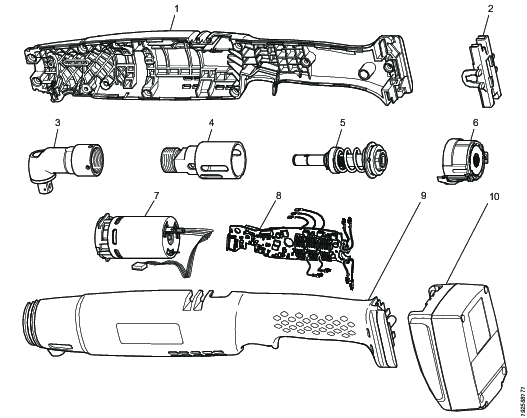
|
Pos. |
Part |
Remarks |
Recycle as |
|---|---|---|---|
|
1 |
Plastic housing |
|
Plastics, other, PA |
|
2 |
Battery connector |
Plastics, other, PA | |
|
3 |
Angle gear |
Metal, steel | |
|
4 |
Clutch housing |
Metal, aluminum | |
|
5 |
Clutch |
Metal, steel | |
|
6 |
Gear |
Metal, steel | |
|
7 |
Motor |
Electronic | |
|
8 |
Circuit board |
Electronic | |
|
9 |
Plastic housing |
Plastics, other, PA | |
|
10 |
Li-Ion battery |
Electronic |