Installing the EV Cover

When the insulated cover is installed, the shock indicator is not visible.
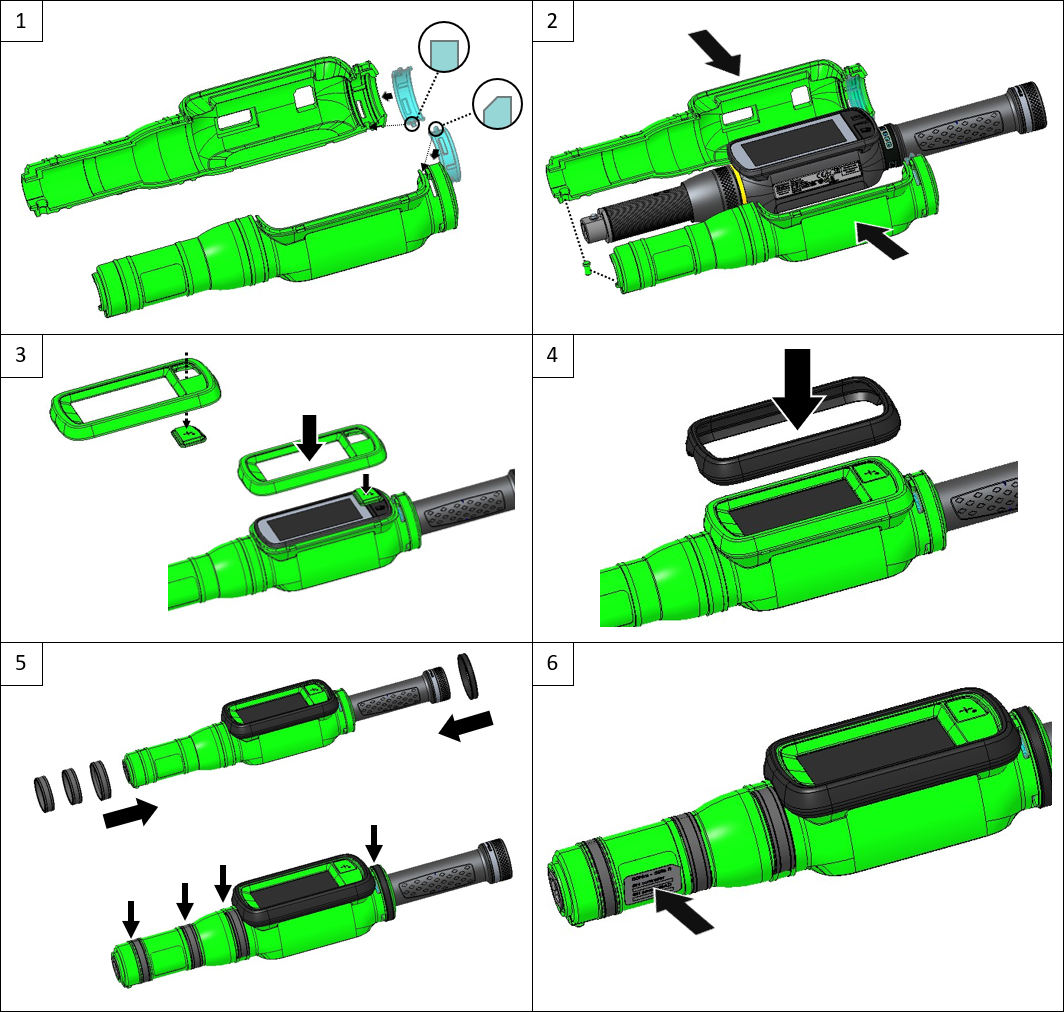
Attach the two halves of the LED ring protection to the two halves of the EV cover as follows:
Attach the half of the LED ring protection that has a beveled positioning pin with the positioning pin facing the front of the EV cover.
Attach the half of the LED ring protection that has a square positioning pin with the positioning pin facing the back of the EV cover.
Attach the two halves of the EV cover to the STRwrench by inserting the eject pin into its spot.
Gently press and remove the button cover on the insulated frame for the STRwrench display. Then, place the button cover on the STRwrench button, and attach the insulated frame to the STRwrench display.
Insert the rubber profile on the insulated display frame.
Insert the four rubber rings on the EV cover.
Attach the label with the following information: tool capacity, controller serial number, smartHEAD S/N.