TNSNAMES
To connect to the Oracle database, an alias needs to be added to the tnsnames.ora file.
Tnsnames.ora is located in the Oracle home folder. For example: C:\OracleClients\Administrator\product\12.1.0\client_64\Network\Admin If you don’t have one, you can copy the sample Tnsnames.ora from the sample folder.
Check the following file paths:
C:\<oracle home folder>\Administrator\product\12.1.0\client_64\Network\Admin
C:\<oracle home folder>\Administrator\product\12.1.0\client_32\Network\Admin
for the file
Tnsnames.ora.If the file
Tnsnames.oracan be found in both folders, open each of the files in any plain text editor and make sure that they look like the following.Example of a filled in
Tnsnames.orafile - opened in a plain text editor: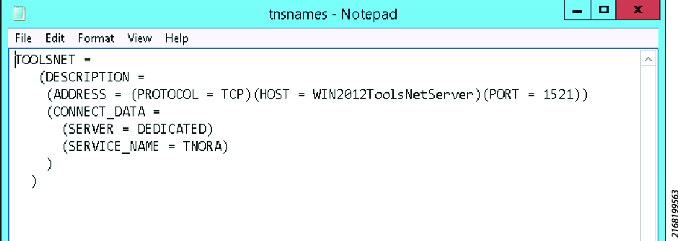
TOOLSNET =(DESCRIPTION =(ADDRESS = (PROTOCOL = TCP)(HOST =<WIN2012ToolsNetServer>)(PORT =1521))(CONNECT_DATA =(SERVER = DEDICATED)(SERVICE_NAME = TNORA)))If
Tnsnames.oracan’t be found in either folder, copy the sampleTnsnames.orafrom the sample folder into the folders specified above and fill in the<blanks>in the file.Sample file:
Tnsnames.ora- opened in a plain text editor.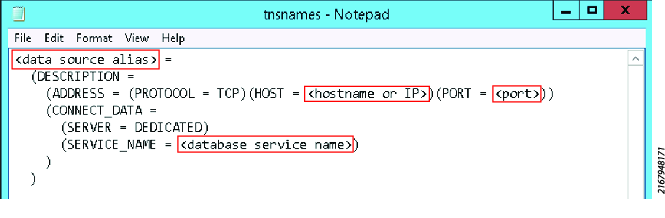
<data source alias>
=(DESCRIPTION =(ADDRESS = (PROTOCOL = TCP)(HOST =<hostname or IP>)(PORT =<port>))(CONNECT_DATA =(SERVER = DEDICATED)(SERVICE_NAME =<database service name>)))









































