Doing a test
In case of STpad, make sure that the STbench or STpad cable adpter is connected to the device (for more information, see “Measuring Devices”).
In the Home page, tap Isolated mode > Torque. The following is displayed:
In the Select transducer window, select the transducer to use during the test.
The following Torque page is automatically displayed:
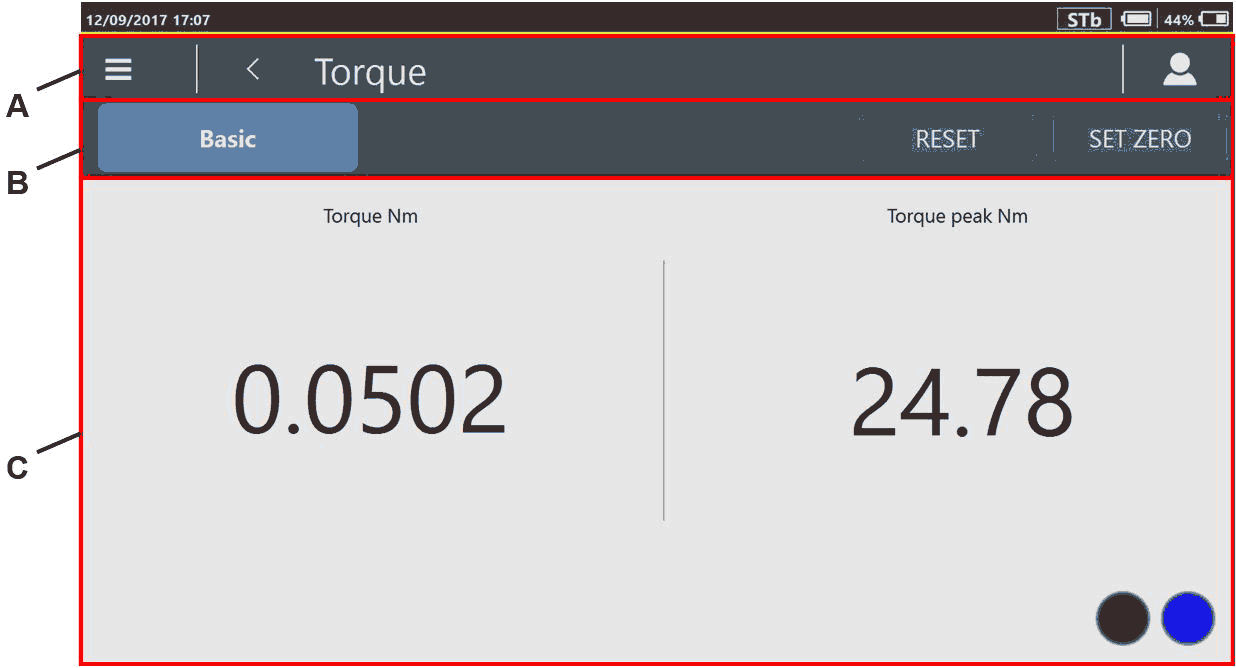
B
Reset / Set Zero
C
Results section
To set the Torque peak value to 0 N·m, tap Reset.
To set the measured Torque value as reference point, Tap Set zero.

"Set zero" available only for STBench
The Free track test result section is as follows:
Torque (N·m): torque measured during the free track test.
Torque peak (N·m): torque peak measured during the free track test.
 : the STbench is ready for a new result.
 : the STbench is working (it is either doing a result or sending a trace).
Apply torque either clockwise or counterclockwise. Torque applied in counterclockwise direction gives negative torque values.









































