Quick network guide
What is IP address
IP address is a unique identifier for each device on the network, two different devices cannot have the exact same IP address. The IP address combined with the subnet mask decides which devices that can communicate with each other.
How does Subnet mask work
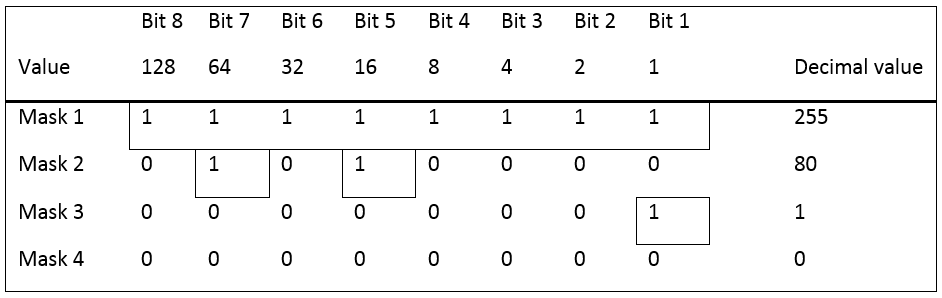
Subnet mask is the identifier used to tell each device who they can communicate with on the network. The following table shows where everything is marked to visually display which devices that can communicate to each other depending on the subnet mask.
Question: With subnet mask 255, which controllers can communicate with each other?

Answer: With subnet mask 255, all bits must have the same value. That means that IP 1 and 5, IP 3 and 6 can communicate with each other.
Question: With subnet mask 80, which controllers can communicate with each other?

Answer: With subnet mask 80, bit 7 and 5 must have the same value. That means that IP 1, 3, 5 and 6 can communicate with each other.
Question: With subnet mask 1, which controllers can communicate with each other?

Answer: With subnet mask 1, bit 1 must have the same value. That means that IP 1, 3, 5 and 6, IP 2 and 4 can communicate with each other.
Question: With subnet mask 0, which controllers can communicate with each other?
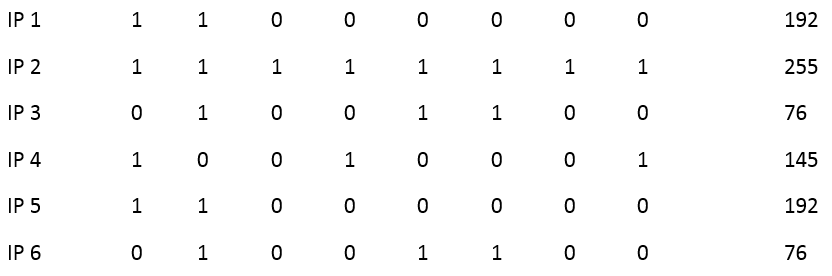
Answer: With subnet mask 0, 0 bits must have the same value. That means that all IP addresses can communicate with each other.
Correct settings
Here are some examples on the correct ways to setup the MTF6000 and ToolsNet server communication.
Each IP address is built of 4 parts, all containing 8 bits and must match the corresponding subnet mask. The easiest and most common setup is to have the three first parts exactly the same with subnet mask 255.255.255.0. This means that the last part can be any number between 0-255.

Part | Subnet mask | IP address | Gateway | ToolsNet | Match |
|---|---|---|---|---|---|
1 | 255 | 192 | 192 | 192 | Full Match |
2 | 255 | 168 | 168 | 168 | Full Match |
3 | 255 | 1 | 1 | 1 | Full Match |
4 | 0 | 60 | 1 | 100 | No match needed |
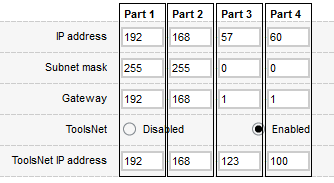
Part | Subnet mask | IP address | Gateway | ToolsNet | Match |
|---|---|---|---|---|---|
1 | 255 | 192 | 192 | 192 | Full Match |
2 | 255 | 168 | 168 | 168 | Full Match |
3 | 0 | 57 | 1 | 123 | No match needed |
4 | 0 | 60 | 1 | 100 | No match needed |
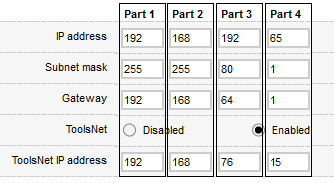
Part | Subnet mask | IP address | Gateway | ToolsNet | Match |
|---|---|---|---|---|---|
1 | 255 | 192 | 192 | 192 | Full Match |
2 | 255 | 168 | 168 | 168 | Full Match |
3 | 80 | 192 | 64 | 76 | Full match for bit 5 and 7 |
4 | 1 | 60 | 1 | 100 | Full match for bit 1 |
Incorrect settings
Here are some examples on the incorrect ways to setup the MTF6000 and ToolsNet server communication.
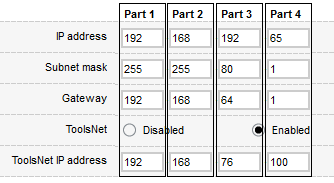
Part | Subnet mask | IP address | Gateway | ToolsNet | Match |
|---|---|---|---|---|---|
1 | 255 | 192 | 192 | 192 | Full Match |
2 | 255 | 168 | 168 | 168 | Full Match |
3 | 80 | 192 | 64 | 76 | Full match for bit 5 and 7 |
4 | 1 | 65 | 1 | 100 | No match for bit 1 |


Part | Subnet mask | IP address | Gateway | ToolsNet | Match |
|---|---|---|---|---|---|
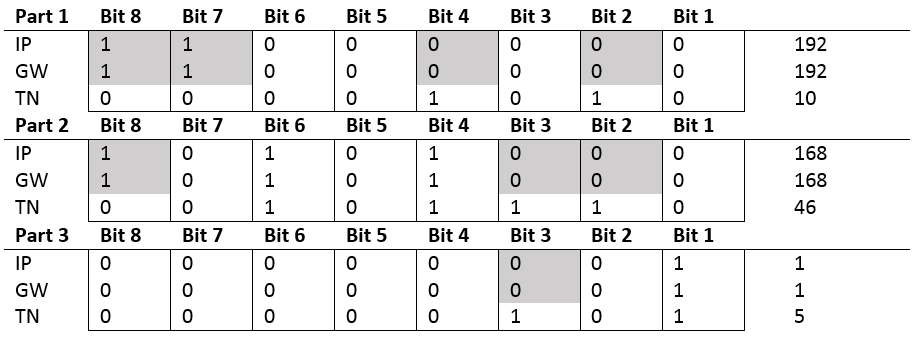
1 | 255 | 192 | 192 | 10 | No match for bit 8, 7, 4 and 2 |
2 | 255 | 168 | 168 | 46 | No match for bit 8, 3 and 2 |
3 | 255 | 1 | 1 | 5 | No match for bit 3 |
4 | 0 | 60 | 1 | 37 | No match needed |