Adjusting the workload
The balancer is factory set to carry a maximum workload.
To adjust the balancer to carry different workloads, turn the endless screw on the balancer in minus (-) or plus (+) direction.
(-) for lighter workload
(+) for heavier workload
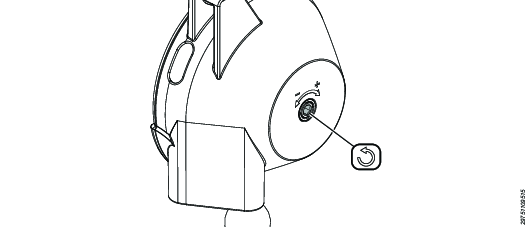

Attach the workload on the snap hook.
Turn the endless screw in minus (-) or plus (+) direction to adjust the counterbalance weight.

To turn the endless screw use a hexagon key for WP 105; press and turn
Setting the initial tension of the balancer
The initial tension of the balancer need to be set if the spring has been released during service.
To get the maximum initial tension of the balancer, turn the endless screw in the plus (+) direction x number of times, refer to the table below.
4390190173 | x = approx 11 |
4390190174 | x = approx 5 |
4390190175 | x = approx 6 |
4390190176 | x = approx 5 |
4390190178 | x = approx 4 |
4390190179 | x = approx 11 |
4390190180 | x = approx 5 |
4390190181 | x = approx 6 |
4390190182 | x = approx 5 |
4390190183 | x = approx 4 |
Setting the minimum workload
When setting the minimum workload, never use a wire length of more than 1.0 m as the spring fracture device may release.
If the spring fracture device releases:
Carefully adjust the spring tension in the (+) direction.
Attach the workload.
Adjust the counterbalance weight of the workload by turning the endless screw in the minus (-) direction.









































